Token Manage
Token Manage brings together your point balance, the transfer form, every transaction record, and the private spectra you have paid to unlock. The current account details stay at the top of the page, followed by three panels: Token Transaction, Latest Transaction Record, and Unlocked Private Spectra.
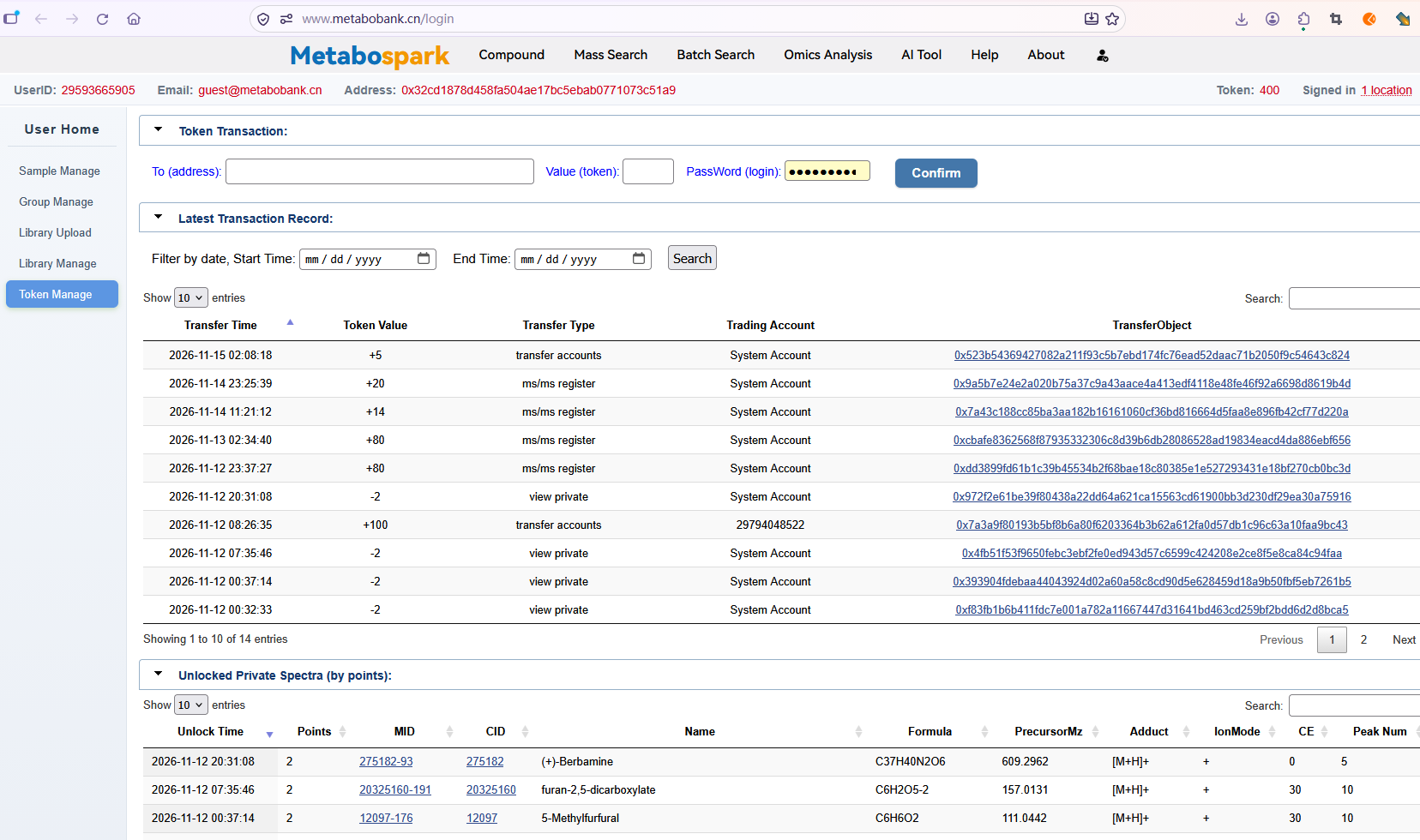
1. Account bar
| Field | Description |
|---|---|
| UserID / Email | The platform ID and email of the signed-in user, shown here as 29593665905 / guest@metabobank.cn. |
| Address | Your on-chain wallet address (0x32cd…51a9 in the screenshot). All point receipts, payments, and transfers are tied to this address. |
| Token | Currently available point balance, 400 in the screenshot. |
| Signed in | Number of active sessions. 1 location means you are signed in from one place only. |
2. Token Transaction: transferring points to another user
| Field | Description |
|---|---|
| To (address) | The recipient's on-chain address. |
| Value (token) | Number of points to transfer. |
| PassWord (login) | Your account login password, used to confirm the transfer. |
| Confirm | Submits the transfer. |
3. Latest Transaction Record: transaction history
Records are sorted by Transfer Time in descending order, so the newest entry appears first. Use Start Time / End Time and click Search to filter a date range, Show 10 entries to change the page size, the Search box at the top right to filter within the table, and Previous / Next to page through the results.
| Column | Description |
|---|---|
| Transfer Time | When the transaction occurred. |
| Token Value | Point change: positive values are income, negative values are spending. |
| Transfer Type | Kind of transaction, listed in the table below. |
| Trading Account | The counterparty: either System Account or another user's UserID. |
| TransferObject | On-chain transaction hash, which can be opened in a block explorer to verify both parties and the amount. |
| Transfer Type | Direction | Meaning |
|---|---|---|
| ms/ms register | Positive | Reward granted after a mass spectrum is registered successfully. |
| transfer accounts | Positive | Points transferred by another user, or forwarded by the system after your private spectrum is unlocked. |
| view private | Negative | Points paid to unlock another user's private spectrum. |
| user register | Positive | The 100-point welcome credit for a new account. |
The entries in the screenshot map directly to these types:
| Transfer Time | Token Value | Transfer Type | Trading Account |
|---|---|---|---|
| 2026-11-15 02:08:18 | +5 | transfer accounts | System Account |
| 2026-11-14 23:25:39 | +20 | ms/ms register | System Account |
| 2026-11-14 11:21:12 | +14 | ms/ms register | System Account |
| 2026-11-13 02:34:40 | +80 | ms/ms register | System Account |
| 2026-11-12 20:31:08 | −2 | view private | System Account |
| 2026-11-12 08:26:35 | +100 | transfer accounts | 29794048522 |
4. Unlocked Private Spectra (by points): spectra you have paid to unlock
This list records every private spectrum you have unlocked with points. Each row is one unlock, and searching or opening these spectra again does not deduct points a second time.
| Column | Description |
|---|---|
| Unlock Time | When the spectrum was unlocked; it matches the Transfer Time of the corresponding view private entry above. |
| Points | Points paid at the time of unlocking. |
| MID / CID | Spectrum ID and PubChem compound ID. |
| Name / Formula | Compound name and molecular formula. |
| PrecursorMz / Adduct / IonMode | Precursor m/z, adduct, and ion mode. |
| CE / Peak Num | Collision energy and number of peaks. |
| Unlock Time | Points | MID / CID | Name | Formula | PrecursorMz |
|---|---|---|---|---|---|
| 2026-11-12 20:31:08 | 2 | 275182-53 / 275182 | (+)-Berbamine | C37H40N2O6 | 609.2962 |
| 2026-11-12 07:35:46 | 2 | 2032516-191 / 20325160 | furan-2,5-dicarboxylate | C6H2O5 | 157.0131 |
| 2026-11-12 00:37:14 | 2 | 12097-176 / 12097 | 5-Methylfurfural | C6H6O2 | 111.0442 |
These three unlocks correspond one-to-one to the −2 view private entries at 2026-11-12 20:31:08, 07:35:46, and 00:37:14 above; all three use the [M+H]+ adduct in positive ion mode.
5. Verifying point movements
First check the sign of Token Value to see whether points came in or went out, then read Transfer Type to identify the business case, and finally open the TransferObject hash in a block explorer to confirm both parties and the amount. The complete earning and spending rules are on the Points & Registration Rules page, and the unlock flow is described in Private Spectrum.
Related pages: Points & Registration Rules (scoring and unlock rules) · Private Spectrum (unlock flow) · Library Manage (registration and sharing)