Points & Registration Rules
The platform uses Token (points) to measure data contribution and use. Balances are held in blockchain accounts, and every credit or debit generates a verifiable transaction record in Token Manage. This page follows the complete flow: where points come from, how registration is scored, and how private-spectrum unlock payments are transferred.
1. Reading transaction records: positive values are income, negative values are spending
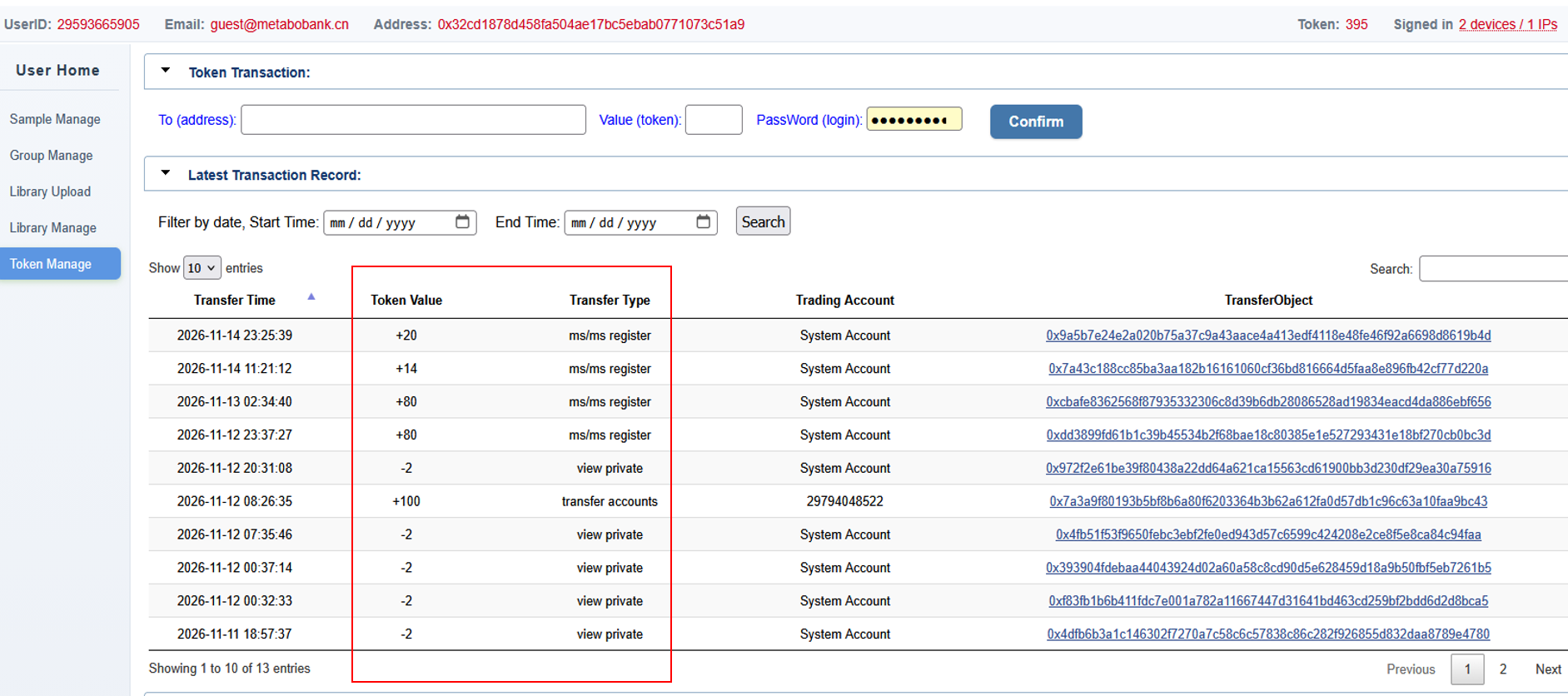
The top of Token Manage shows the current UserID, Email, Address, and Token balance. Latest Transaction Record below lists every transaction by time.
| Transfer Type | Direction | Meaning |
|---|---|---|
| ms/ms register | Positive | A registration reward issued after your mass spectrum is accepted. |
| transfer accounts | Positive | A transfer from another user, or income forwarded by the system after someone unlocks your private spectrum. |
| view private | Negative | Points paid to unlock another user's private spectrum. |
| user register | Positive | The 100-point welcome credit issued when a new account is created. |
Trading Account identifies the counterparty for the transaction. TransferObject is the on-chain transaction hash, which can be opened in a block explorer for verification.
2. Ways to earn and spend points
| Activity | Points | Trigger |
|---|---|---|
| New user registration | +100 | Automatically transferred when the platform account and blockchain wallet are first created. |
| Spectrum registration (first record for this CID) | +100 | No record exists for this CID and no similar spectrum is found. |
| Spectrum registration (CID already has 1–10 records) | +80 | The compound has limited spectral coverage, so a new spectrum still adds substantial value. |
| Spectrum registration (CID already has 11–20 records) | +50 | Spectral coverage is already good, so the incremental value is lower. |
| Spectrum registration (CID already has 21 or more records) | +20 | Spectral coverage is extensive; only the base reward remains. |
| Another user unlocks your private spectrum | +unlock price | When another user pays to unlock your private spectrum, 100% of the payment is transferred to you; the platform takes no commission. |
| User-to-user transfer | Same amount | Enter the recipient address and amount in Token Manage. Only the holder changes. |
| Unlock another user's private spectrum | −unlock price | The owner sets the price (0–50). A price of 0 is free but still creates a record. Unlocking fails if the balance is insufficient. |
| Compound/mass search and batch matching | Free | Searching and matching public spectra costs no points. Only unlocking private spectra deducts points. |
3. How points are calculated when registering a private spectrum
When you click Register / Register One in Library Manage, the system first determines a base reward from the number of existing spectra for the compound, then checks for duplicates. If it finds spectra with a precursor m/z difference of no more than 0.005 and a matching peak fingerprint (Peak_md5 / Peak_key), it scores each match and deducts that score from 20 points.
| Comparison | Score | Criterion |
|---|---|---|
| Peaks | 3 | The peak list is point-by-point identical to the library spectrum (same Peak_md5), shown as identical. |
| Peaks | 2 | Peak-position deviation is below 0.001 and more than 50% of the peaks are shared. |
| Peaks | 0 | All other cases. |
| Adduct | 2 | Both Adduct and IonMode are the same. |
| Adduct | 0 | Adduct or IonMode differs, shown as different. |
| Compound | 3 | The CID is the same, shown as identical. |
| Compound | 0 | The CID differs. |
Scores from multiple matches are deducted cumulatively. If the final reward is 0 or less, the spectrum is not registered and MID is shown as null, preventing duplicate data from entering the library. A single match has a maximum score of 8 (peaks 3 + adduct 2 + compound 3), leaving a reward of 12 points.
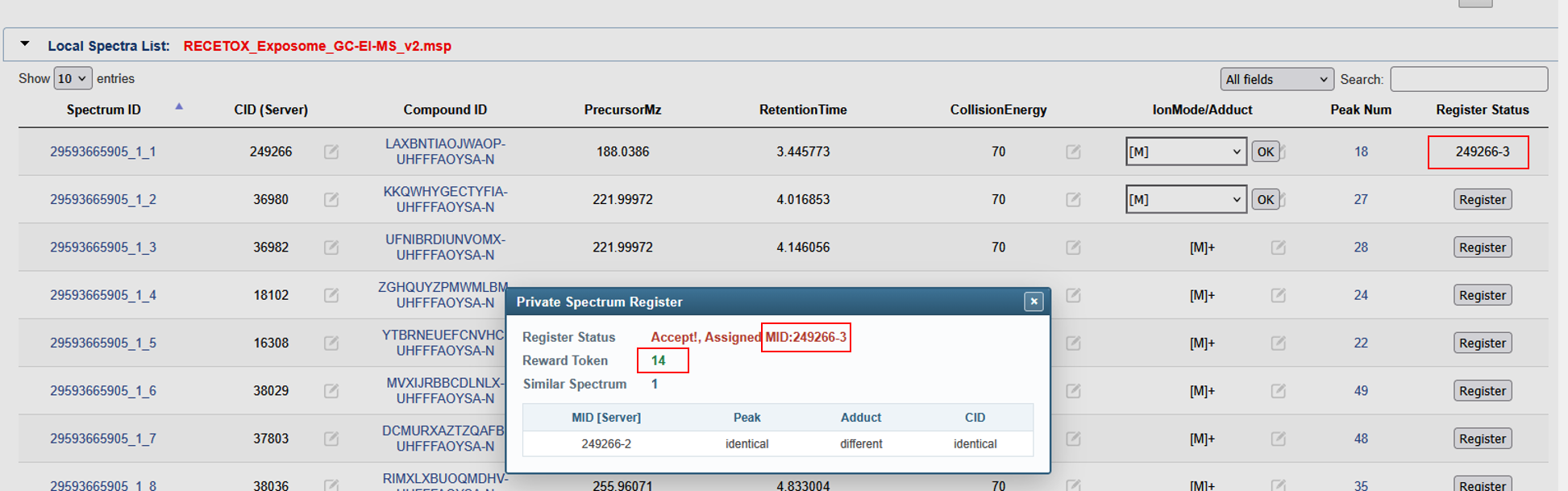
| Calculation in Figure 2: 20 − (3 + 0 + 3) = 14 | |||
|---|---|---|---|
| Comparison | Result | Score | Explanation |
| Peak | identical | 3 | The peak list is identical to that of 249266-2. |
| Adduct | different | 0 | The adducts differ, so no points are deducted for this item. |
| CID | identical | 3 | The same compound (CID 249266). |
This +14 reward is the ms/ms register record at 2026-11-14 11:21:12 in Figure 1. The +20 and +80 entries on the same page correspond respectively to base rewards for a CID with at least 21 existing records and a CID with 1–10 existing records.
4. Unlocking a private spectrum: two user views of the same transaction
Private-spectrum content is hidden by default in search results. Clicking Unlock opens a confirmation dialog showing the required points, your balance, the data owner, and how the payment is distributed.
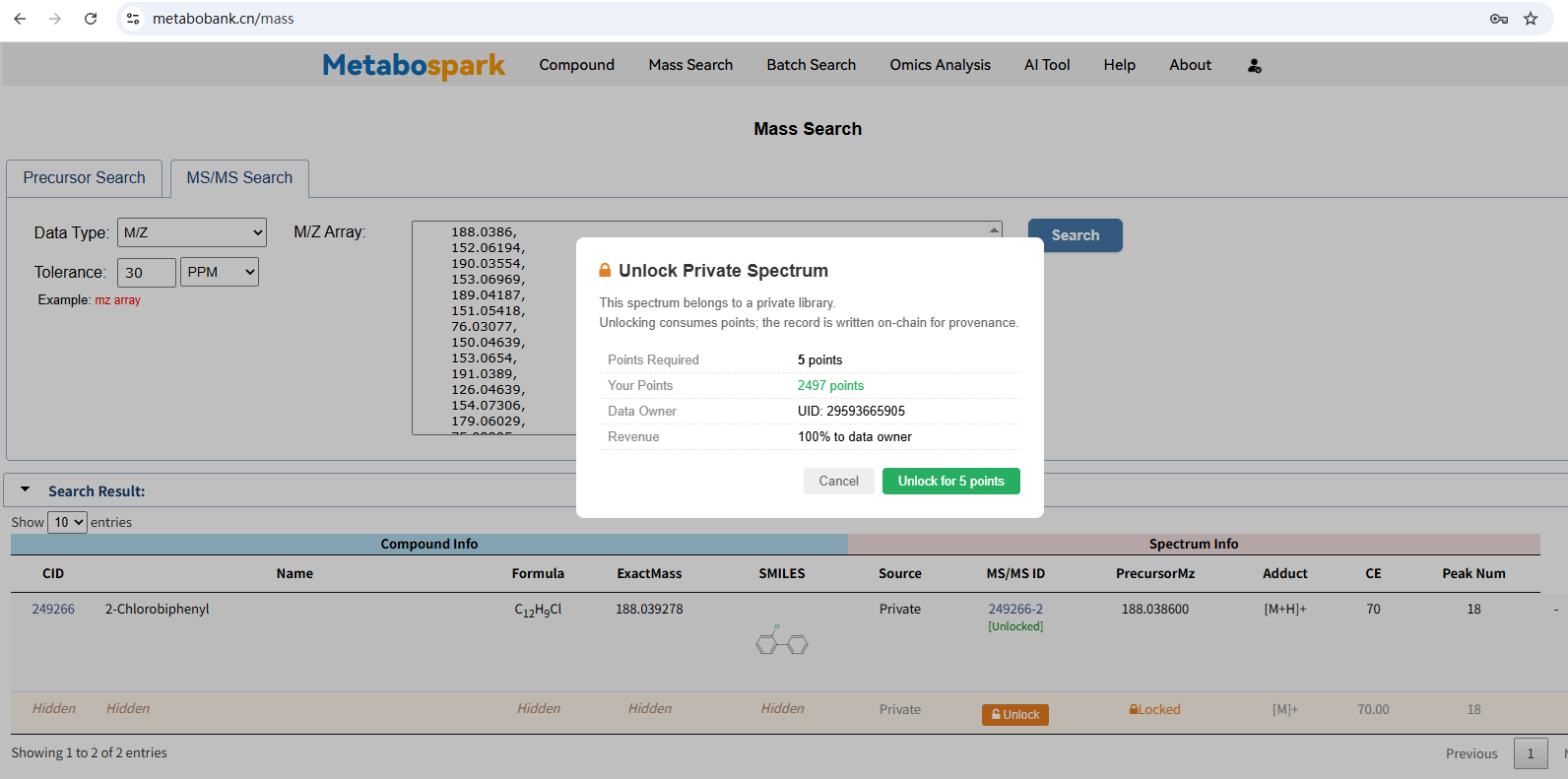
After confirmation, points move along the path viewer → System Account → spectrum owner. A single unlock creates only one transaction record. The two figures below show the viewer and the spectrum owner viewing the same transaction from their respective accounts; they do not represent two separate transactions:
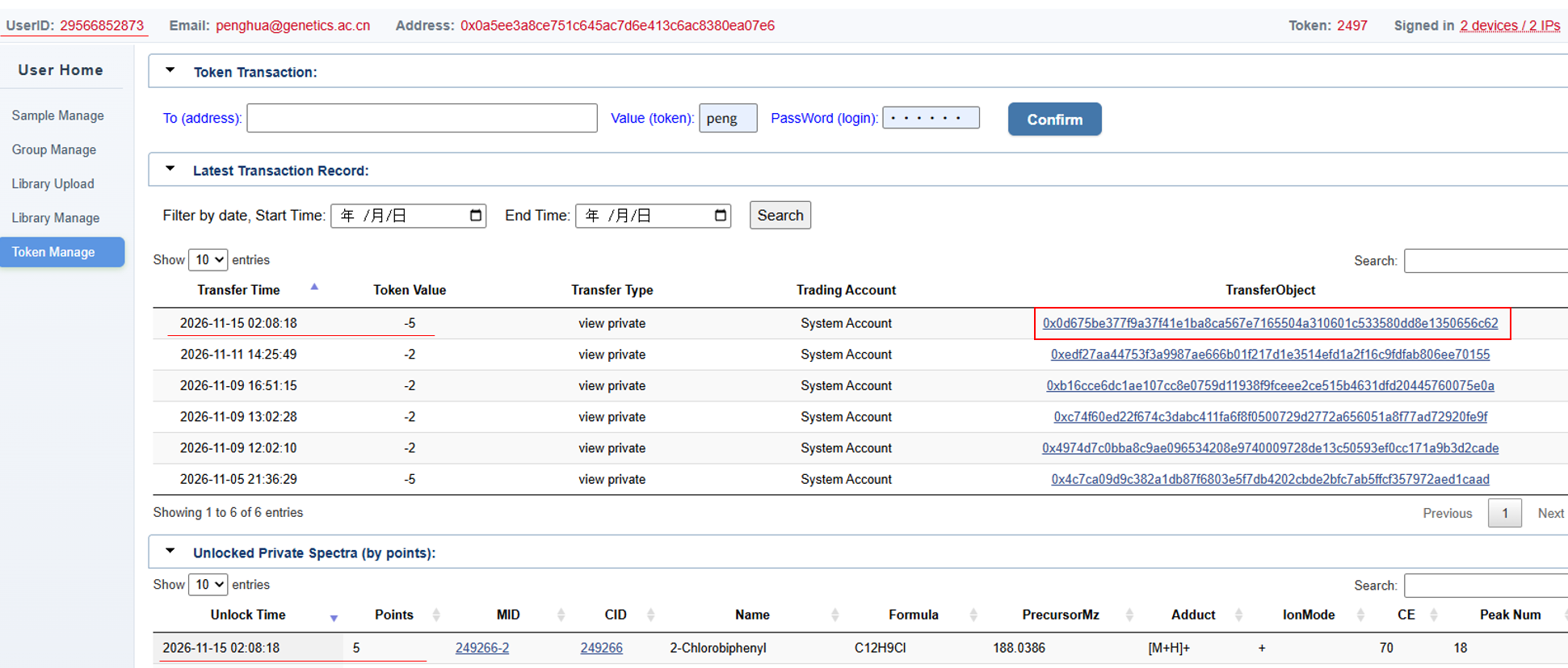
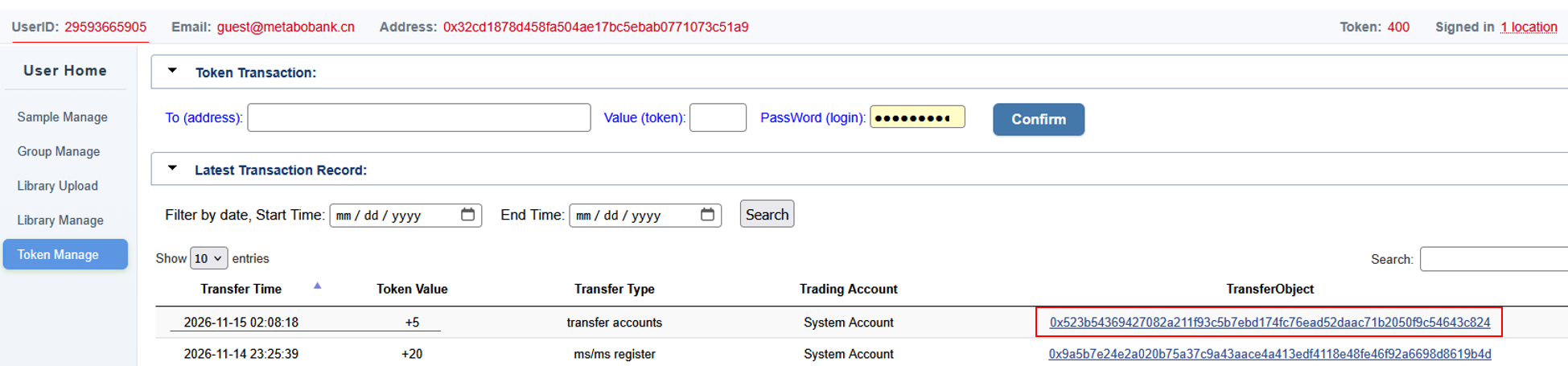
| Comparison | Figure 4 (viewer) | Figure 5 (owner) |
|---|---|---|
| Time | 2026-11-15 02:08:18 | 2026-11-15 02:08:18 |
| Token Value | −5 | +5 |
| Transfer Type | view private | transfer accounts |
| Trading Account | System Account (same) | System Account (same) |
Unlocked spectra do not need to be paid for again
Once recorded on-chain, an unlock remains valid. Purchased spectra appear in Unlocked Private Spectra (by points) at the bottom of Token Manage. In Figure 4, the row shows Points = 5, MID = 249266-2, Name = 2-Chlorobiphenyl, Formula = C12H9Cl, PrecursorMz = 188.0386, and Adduct = [M+H]+. Whenever you search for or open this spectrum again, its content is displayed directly and no additional points are deducted. Only spectra that have not yet been unlocked show the Unlock button again.
5. How to verify point movements
Open Token Manage and filter transactions by start and end dates. Positive values are income and negative values are spending. TransferObject is the on-chain hash, which can be checked in a block explorer to verify both parties and the amount. Unlocked Private Spectra at the bottom lists every private spectrum you have paid to unlock and confirms that no repeat payment is required.
Related pages: Library Manage (registration and sharing) · Private Spectrum (unlock flow) · Token Manage (transaction records)